How to Track a Mobile Number Location (The Facts vs. The Fakes)
Track a Mobile Number. Let’s be real. You’ve searched for “track mobile number,” probably because you got a call from an unknown number or, worse, you’ve lost your own phone. You want to see a precise, live-tracking dot on a map.
Here is the most important truth you need to read: No website or app—not Truecaller, not anyone—can show you the live GPS location of a phone just by entering its number.
It is technically impossible and highly illegal.
So, what do those “tracker” websites actually do? And what are the real methods to find a phone? Let’s bust some myths and get you some actual answers.
What Do “Mobile Number Tracker” Websites Actually Do?
When you use a site like emobiletracker or mobilenumbertracker.inYou’re not seeing a live location. You are only seeing two pieces of public data:
- Service Provider: If the SIM is an Airtel, Jio, or BSNL number.
- Telecom Circle: The state where the SIM card was originally registered (e.g., “Andhra Pradesh / Telangana”).
This does not tell you where the phone is now. A person can be using a Delhi-registered number in Hyderabad. This information is useless for live tracking.
What about Truecaller?
Truecaller is different, but it still doesn’t show a live GPS location. It shows the “Telecom Circle.” Its real power is showing you the “Name” associated with that number, which it gets from its massive, crowd-sourced database (i.e., what other users have saved that number as).
Method 1: Tracking Your Own Lost Phone (This 100% Works)
If you want to track your own device, you don’t need a shady website. You use the official, built-in systems.
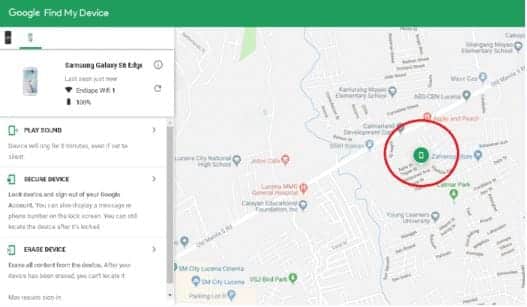
1. For Android Users: Google “Find My Device”
This is the only and best way to find your lost Android phone.
- How: Go to
android.com/findon any computer or another phone. - Requirement: You MUST log in with the same Google (Gmail) account that is active on your lost phone.
- What you can do:
- See Location on Map: If the phone is on and connected to the internet, you will see its current location.
- Play Sound: Make the phone ring at full volume for 5 minutes, even if it’s on silent mode. (Perfect for when it’s lost in the sofa cushions).
- Secure Device: You can lock the phone remotely and display a message on the lock screen (e.g., “This phone is lost. Please call [your friend’s number]”).
- Erase Device: If you know it’s gone for good, you can remotely wipe all data from the device to protect your privacy.
2. For iPhone Users: Apple “Find My”
iPhone users can do the same thing by going to icloud.com/find and logging in with their Apple ID.
Method 2: Finding the Owner’s Details of an Unknown Number
If you’re getting spam calls, you don’t want a location; you want a name. Here are the tricks that actually work.
- Truecaller App: This is the easiest first step. A quick search will usually reveal the name in their database.
- The UPI App Trick (Best Trick): This is brilliant. Open your UPI app (Google Pay, PhonePe, etc.) and go to the “Send Money” screen.
- Enter the unknown mobile number.
- Do NOT send money.
- If that number is linked to any UPI account, the app will instantly show you the person’s full legal name as per their bank records (e.g., “N V S S PRASAD”). This is far more accurate than Truecaller.
- WhatsApp Profile Picture: Save the number to your contacts. Then, check their WhatsApp profile picture (DP) and status message. This often gives you a clear look at the person or their business.
Method 3: The Official Government Portal (CEIR)

If your phone is stolen, you can’t track it yourself, but you can block it legally.
- File an FIR: First, go to the nearest police station and file a complaint. Get a copy of the FIR.
- CEIR Portal: The Government of India has a portal called
ceir.gov.in(part of the Sanchar Saathi initiative). - On this website, you can use your FIR number and the phone’s IMEI number to permanently block the device. Once blocked, it will not work on any mobile network in India (Airtel, Jio, etc.), making it useless for the thief.
Conclusion: What’s Really Possible?
Let’s be clear.
- To find an unknown caller’s name: Use Truecaller or the UPI App Trick.
- To find your own lost phone: Use Google’s Find My Device (Android) or Apple’s Find My (iPhone).
- Online “Tracker” Websites: They are fake. They only show the “State” where the SIM was registered, not the live location.
- Tracking someone else’s live location without their permission: This is illegal and impossible. Any site promising this is a scam.