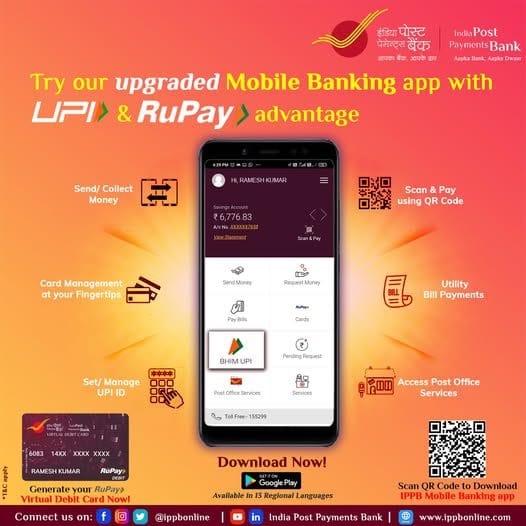
IPPB Mobile Banking: The Ultimate Guide from Registration to Use
Are you an India Post Payments Bank (IPPB) customer? Want to handle your banking tasks right from your phone, without needing to visit the post office? Then the IPPB Mobile Banking app is exactly what you need. From checking your balance to sending money and paying bills, it puts your bank right in your pocket.
This guide provides a clear, step-by-step walkthrough on how to download the IPPB Mobile Banking app (look for it IPPB Mobile in the app stores), register as a new user, explore its key features, and even find that elusive Customer ID. Let’s get started.
Key Features of the IPPB Mobile Banking App
So, what exactly can you do with this app? Quite a bit, actually:
- Account Balance Enquiry: Check your savings account balance and view your recent transactions (Mini Statement).
- Fund Transfer:
- Send money instantly to other IPPB accounts.
- Transfer funds to other bank accounts using NEFT, IMPS, and RTGS.
- Make payments using UPI.
- Bill Payments: Pay a wide range of bills – electricity, water, gas, mobile recharge, DTH recharge, and more. It’s like a digital Swiss Army knife for your bills.
- Post Office Services:
- Link your Post Office Savings Account (POSA) to your IPPB account and transfer money between them.
- Deposit funds into Post Office schemes like Sukanya Samriddhi Yojana (SSA), Public Provident Fund (PPF), and Recurring Deposit (RD).
- Other Services: Request a cheque book, view your account statement, get a virtual debit card, and more.
How to Register for IPPB Mobile Banking (Step-by-Step)
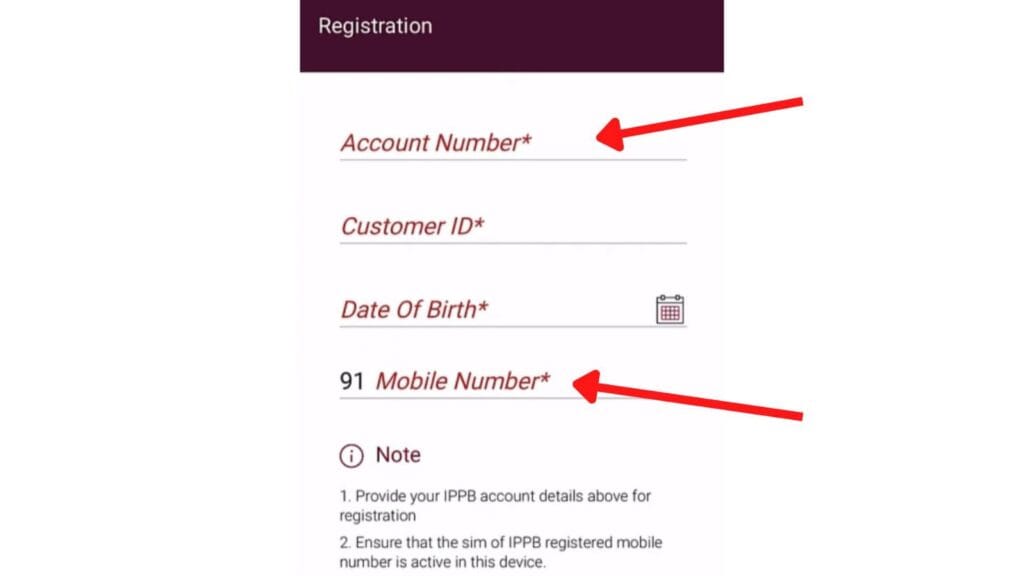
If you’re using the app for the first time, follow these simple steps:
- Download the App: Head over to the Google Play Store or Apple App Store, search for “IPPB Mobile,” download, and install it.
- Open the App: Launch the app and tap on the “Login Now” button.
- Enter Your Details: You’ll be asked for the following information:
- Account Number: Your IPPB account number.
- Customer ID (CIF ID): Your unique customer identification number (we’ll cover how to find this below).
- Date of Birth: As registered with the bank.
- Mobile Number: The number registered with your IPPB account.
- Set Your MPIN: Now, create a 4-digit MPIN (Mobile banking Personal Identification Number). You’ll use this to log in every time. Enter it twice to confirm. Guard this MPIN like it’s the secret recipe for Biryani – don’t share it with anyone!
- Enter OTP: An OTP (One Time Password) will be sent to your registered mobile number. Enter it in the app.
- Registration Complete: If the OTP matches, congratulations! Your registration is successful. You can now log in using your newly set MPIN.
(In some cases, you might be asked to set up security questions for added safety. Choose ones you’ll remember.)
How to Find Your IPPB Customer ID (CIF ID)?
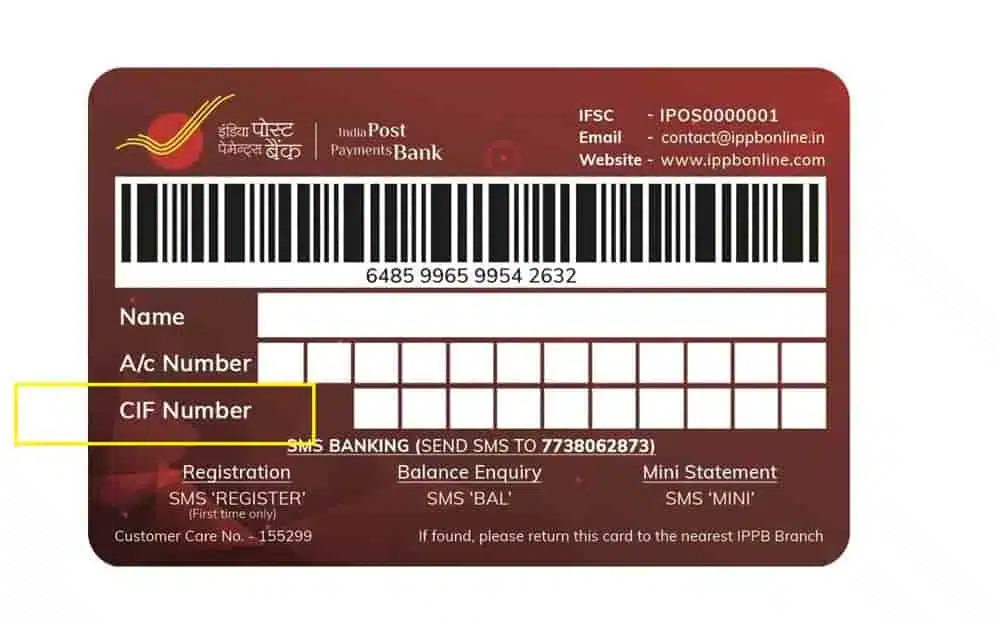
This is often the missing piece during registration. Here’s how you can find your Customer ID:
- Welcome Kit / Passbook: Your Customer ID is usually printed on the welcome kit or passbook you received when you opened the account. Dig it out!
- Account Statement: Check your IPPB account statement; the Customer ID should be mentioned there.
- SMS: Try sending an SMS REGISTER from your registered mobile number to 7738062873. You might receive your Customer ID in reply (this doesn’t always work, but worth a shot).
- Customer Care: Call the IPPB Customer Care number 155299. After verifying your identity, you can ask for your Customer ID. Be prepared for some hold music.
- Post Office: Visit your nearest Post Office branch. Provide your account details, show your ID, and request your Customer ID.
How to Use the App?
Once registered, using the app is straightforward:
- Login: Open the app and enter your 4-digit MPIN.
- Dashboard: You’ll see your main dashboard displaying your balance and options like Fund Transfer, Bill Payments, etc.
- Select Service: Tap on the service you need (e.g., Send Money, Pay Bills) and follow the on-screen instructions. It’s designed to be fairly intuitive.
Important Safety Tips
- Never share your MPIN, OTP, card details, or account information with anyone – not even someone claiming to be from the bank. Seriously, don’t.
- Avoid clicking on suspicious links or downloading unofficial apps. Stick to the official app stores.
- Use a password, pattern, or fingerprint lock on your phone.
- Try to avoid using banking apps on public Wi-Fi networks if possible. Use your mobile data instead.
Conclusion
The IPPB Mobile Banking app is a genuinely useful tool for India Post Payments Bank customers. It saves time, simplifies banking, and brings convenience to your fingertips. Follow the steps above to get registered easily and enjoy a secure digital banking experience. Now go forth and bank from your couch!